Lambda as a Content Delivery Engine: On-Demand Image Transformation at the Edge
Your blog loads fast. The HTML is pre-rendered, the CDN has a 99% cache hit rate, Time to First Byte is under 50ms. Then you look at the images.
A full-resolution JPEG shot at 4K — 3.2 MB — delivered to a 375px mobile screen. Chrome downloads the whole thing, scales it down in CSS, discards 95% of the pixels. The user waited for four seconds of network transfer to see data their device never needed.
This isn't a CDN configuration problem. It's an architecture problem. Static files are static — you can't transform them at request time without something that can execute code. That something is Lambda.
The Static File Problem
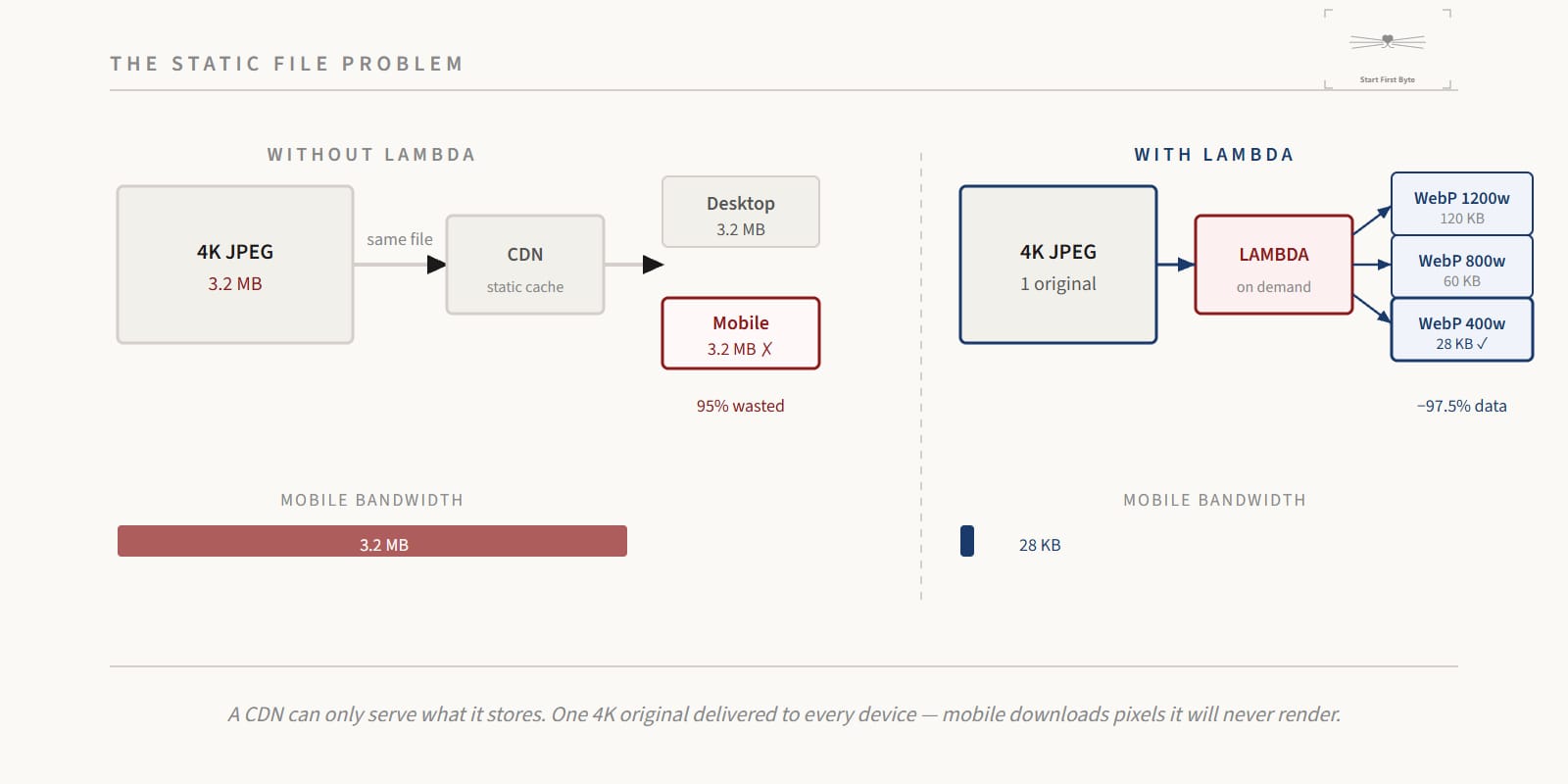
Traditional CDNs are byte-perfect caches. You upload a file; they serve it. They're extraordinarily good at that one thing. But image delivery has requirements that static files can't satisfy:
- A 1200px desktop hero image should be ~120KB WebP
- A 40px avatar thumbnail shouldn't carry 800px worth of pixels
- The same asset needs different dimensions for different contexts
The classic workaround is pre-generating variants: image-800w.jpg, image-400w.jpg, image-200w.jpg. For a handful of images, this is manageable. For a content site with dozens of posts, each with multiple images, it creates a maintenance burden — and you still can't handle arbitrary sizes requested by future layouts.
What you actually want is a system that generates the right variant on first request, then caches the result forever. That's what Lambda enables.
The Architecture
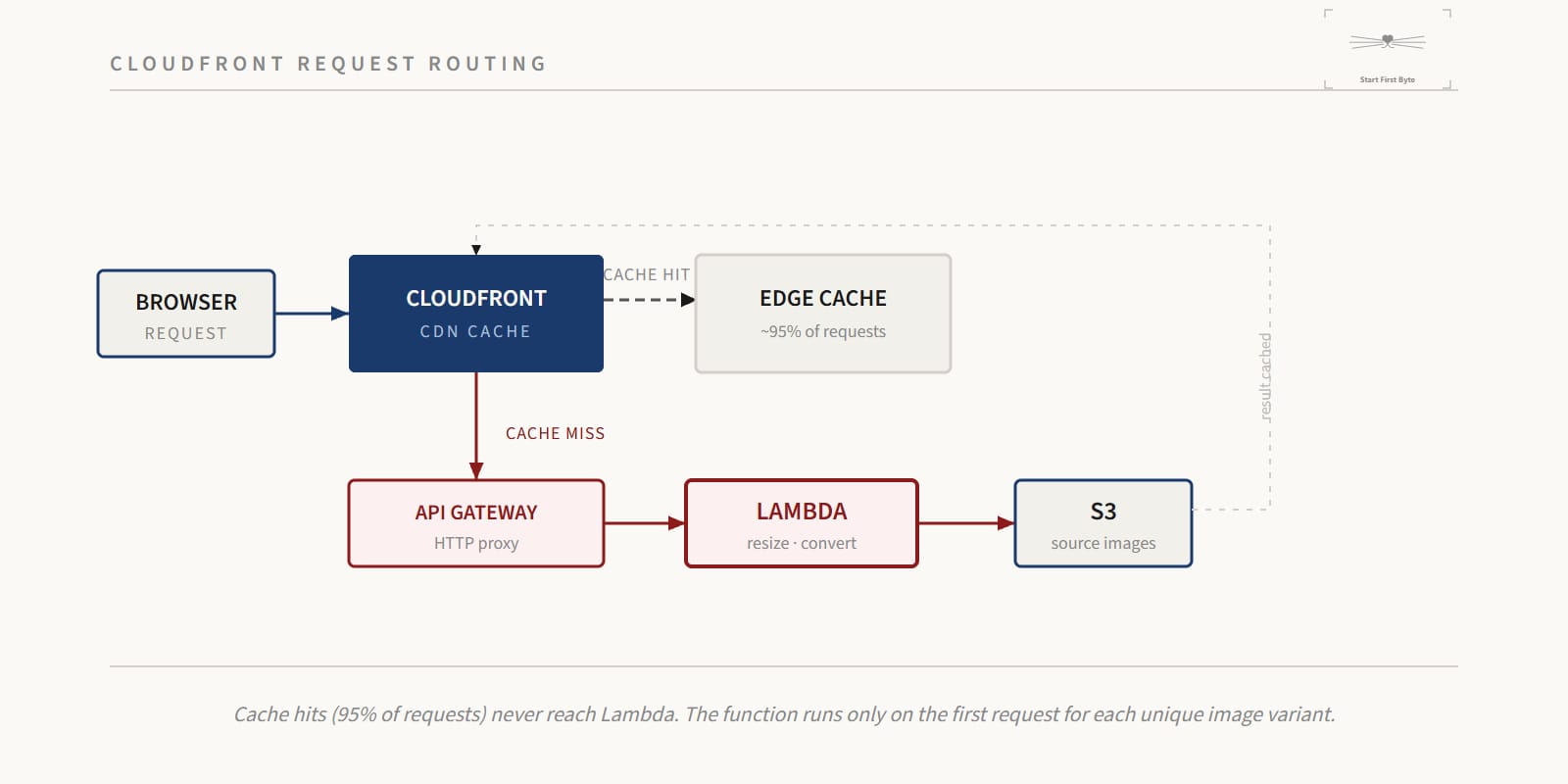
The pattern is three components working together:
Browser
  │
  ▼
CloudFront (CDN cache)
  │  cache MISS
  ▼
API Gateway (HTTP proxy)
  │
  ▼
Lambda (resize + convert)
  │
  ▼
S3 (source images)
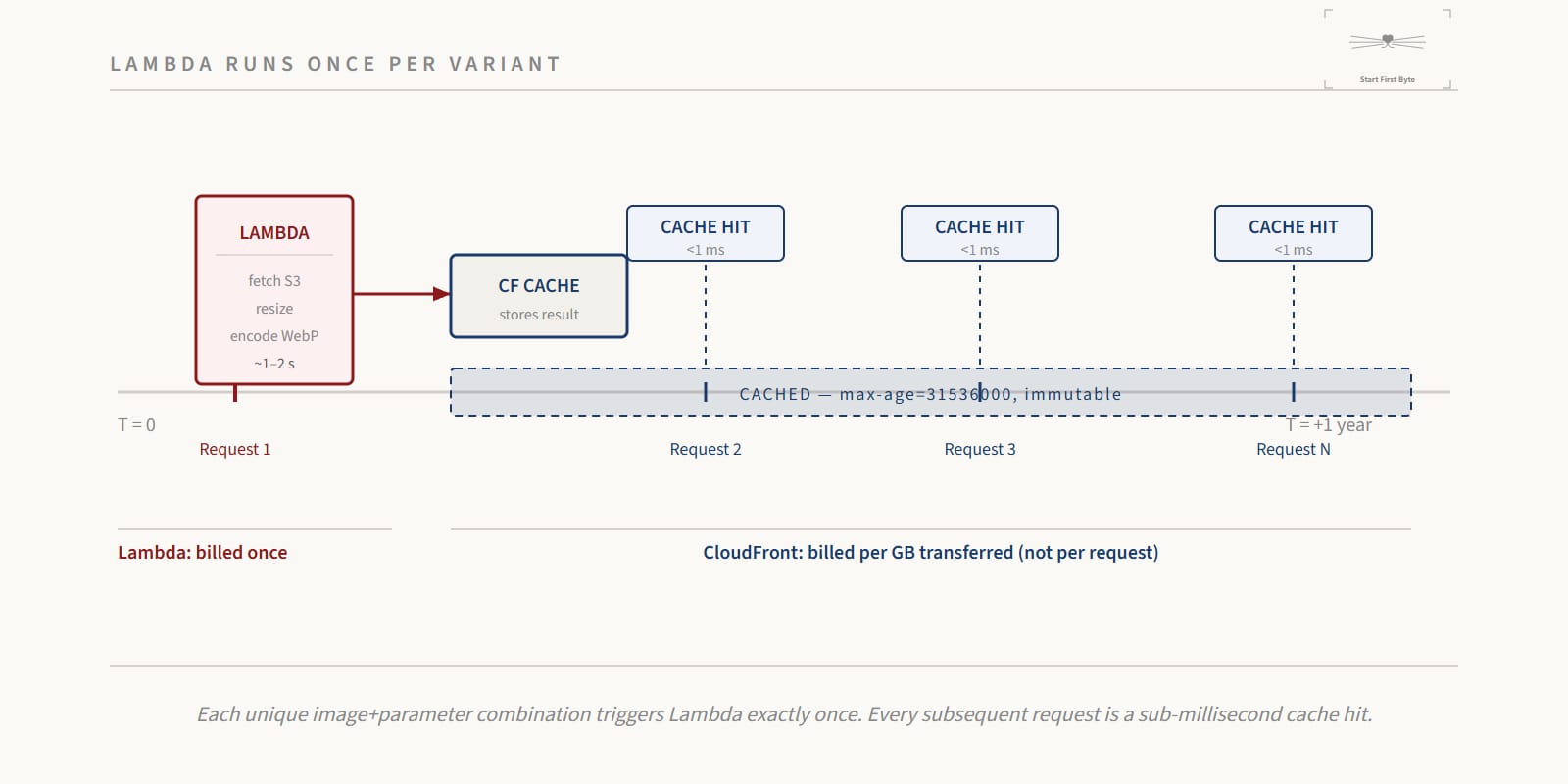
On a cache miss, CloudFront forwards the request to API Gateway, which invokes Lambda. Lambda fetches the original image from S3, transforms it with sharp, and returns the result as a base64-encoded binary response. CloudFront caches that result — keyed on the URL path and query parameters — for up to a year. The next request for the same image + dimensions hits the cache and never touches Lambda at all.
The result: Lambda runs only for the first request of each unique variant. Everything after that is a cache hit.
The Lambda Function
The handler receives an API Gateway proxy event. The image path comes from the URL; transformation parameters come from the query string.
import sharp from 'sharp';
import { S3Client, GetObjectCommand } from '@aws-sdk/client-s3';
import type { APIGatewayProxyEvent, APIGatewayProxyResult } from 'aws-lambda';

const s3 = new S3Client({});
const SOURCE_BUCKET = process.env.SOURCE_BUCKET!;
const AUTO_WEBP = process.env.AUTO_WEBP === 'Yes';
const MAX_DIMENSION = 3000;

type Fit = 'cover' | 'contain' | 'fill' | 'inside' | 'outside';

function parsePositiveInt(v: string | undefined, fallback?: number): number | undefined {
  if (!v) return fallback;
  const n = parseInt(v, 10);
  return Number.isFinite(n) && n > 0 ? Math.min(n, MAX_DIMENSION) : fallback;
}

function resolveFormat(
  requested: string | undefined,
  acceptHeader: string | undefined,
): { ext: string; contentType: string } {
  const fmt = requested ?? (AUTO_WEBP && acceptHeader?.includes('image/webp') ? 'webp' : 'jpeg');
  switch (fmt) {
    case 'webp':   return { ext: 'webp', contentType: 'image/webp' };
    case 'avif':   return { ext: 'avif', contentType: 'image/avif' };
    case 'png':    return { ext: 'png',  contentType: 'image/png' };
    default:       return { ext: 'jpeg', contentType: 'image/jpeg' };
  }
}

export const handler = async (event: APIGatewayProxyEvent): Promise<APIGatewayProxyResult> => {
  const key = (event.path ?? '').replace(/^\//, '');
  if (!key) {
    return { statusCode: 400, headers: {}, body: 'Missing image path', isBase64Encoded: false };
  }

  const q = event.queryStringParameters ?? {};
  const width   = parsePositiveInt(q['w']);
  const height  = parsePositiveInt(q['h']);
  const quality = parsePositiveInt(q['q'], 80)!;
  const fit     = (q['fit'] as Fit | undefined) ?? 'inside';
  const rotate  = q['rotate'] ? parseInt(q['rotate'], 10) : undefined;
  const flip    = q['flip'] === 'true';
  const flop    = q['flop'] === 'true';
  const gray    = q['grayscale'] === 'true';
  const { ext, contentType } = resolveFormat(q['f'], event.headers?.['accept']);

  // Fetch source image from S3
  let imageBuffer: Buffer;
  try {
    const resp = await s3.send(new GetObjectCommand({ Bucket: SOURCE_BUCKET, Key: key }));
    const chunks: Uint8Array[] = [];
    for await (const chunk of resp.Body as AsyncIterable<Uint8Array>) chunks.push(chunk);
    imageBuffer = Buffer.concat(chunks);
  } catch (err: any) {
    if (err.name === 'NoSuchKey' || err.$metadata?.httpStatusCode === 404) {
      return { statusCode: 404, headers: {}, body: 'Image not found', isBase64Encoded: false };
    }
    console.error('S3 fetch error', err);
    return { statusCode: 502, headers: {}, body: 'Failed to retrieve image', isBase64Encoded: false };
  }

  // Transform with sharp
  let pipeline = sharp(imageBuffer);
  if (rotate !== undefined) pipeline = pipeline.rotate(rotate);
  if (flip) pipeline = pipeline.flip();
  if (flop) pipeline = pipeline.flop();
  if (gray) pipeline = pipeline.grayscale();
  if (width || height) pipeline = pipeline.resize(width, height, { fit, withoutEnlargement: true });

  let outputBuffer: Buffer;
  switch (ext) {
    case 'webp': outputBuffer = await pipeline.webp({ quality }).toBuffer(); break;
    case 'avif': outputBuffer = await pipeline.avif({ quality }).toBuffer(); break;
    case 'png':  outputBuffer = await pipeline.png({ compressionLevel: 8 }).toBuffer(); break;
    default:     outputBuffer = await pipeline.jpeg({ quality, mozjpeg: true }).toBuffer(); break;
  }

  return {
    statusCode: 200,
    headers: {
      'Content-Type': contentType,
      'Cache-Control': 'public, max-age=31536000, immutable',
    },
    body: outputBuffer.toString('base64'),
    isBase64Encoded: true,
  };
};
A few design decisions worth noting:
withoutEnlargement: true — sharp won't upscale an image beyond its natural dimensions. Requesting ?w=5000 on a 400px image returns the 400px original rather than a blurry enlargement.
MAX_DIMENSION = 3000 — a safety ceiling. Without it, a malicious request for ?w=99999&h=99999 would cause Lambda to allocate a very large buffer and likely time out or OOM.
Cache-Control: public, max-age=31536000, immutable — once CloudFront caches this response, it will serve it without revalidation for a full year. This is appropriate because the cache key includes all transformation parameters; a different size produces a different URL.
isBase64Encoded: true — API Gateway requires binary responses to be base64-encoded. CloudFront receives this, decodes it, and delivers raw bytes to the browser.
The Infrastructure: CDK Stack
The Lambda function is only as useful as its surrounding infrastructure. The CDK stack wires up three resources: a Lambda function, an API Gateway that proxies requests to it, and a CloudFront distribution that sits in front and caches everything.
import * as cdk from 'aws-cdk-lib/core';
import * as s3 from 'aws-cdk-lib/aws-s3';
import * as lambda from 'aws-cdk-lib/aws-lambda';
import { NodejsFunction } from 'aws-cdk-lib/aws-lambda-nodejs';
import * as apigw from 'aws-cdk-lib/aws-apigateway';
import * as cloudfront from 'aws-cdk-lib/aws-cloudfront';
import * as origins from 'aws-cdk-lib/aws-cloudfront-origins';
import * as acm from 'aws-cdk-lib/aws-certificatemanager';
import { Construct } from 'constructs';

export class ImageResizerStack extends cdk.Stack {
  constructor(scope: Construct, id: string, props: cdk.StackProps = {}) {
    super(scope, id, props);

    const sourceBucket = s3.Bucket.fromBucketArn(
      this, 'SourceBucket', 'arn:aws:s3:::your-assets-bucket',
    );

    // Lambda: 1GB memory for sharp, 29s timeout (API GW hard limit is 30s)
    const handlerFn = new NodejsFunction(this, 'ImageHandlerFn', {
      runtime: lambda.Runtime.NODEJS_22_X,
      entry: 'lambda/image-resizer/index.ts',
      handler: 'handler',
      timeout: cdk.Duration.seconds(29),
      memorySize: 1024,
      environment: { SOURCE_BUCKET: sourceBucket.bucketName },
      bundling: { nodeModules: ['sharp'] },
    });

    sourceBucket.grantRead(handlerFn);

    // API Gateway: must declare binaryMediaTypes to pass image bytes through
    const api = new apigw.RestApi(this, 'ImageApi', {
      binaryMediaTypes: ['*/*'],
      deployOptions: { stageName: 'image' },
    });

    api.root.addProxy({
      defaultIntegration: new apigw.LambdaIntegration(handlerFn, { proxy: true }),
      anyMethod: true,
    });

    // Cache policy: keyed on all query params, long TTL
    const cachePolicy = new cloudfront.CachePolicy(this, 'ImageCachePolicy', {
      queryStringBehavior: cloudfront.CacheQueryStringBehavior.all(),
      headerBehavior: cloudfront.CacheHeaderBehavior.none(),
      cookieBehavior: cloudfront.CacheCookieBehavior.none(),
      defaultTtl: cdk.Duration.days(1),
      maxTtl: cdk.Duration.days(365),
      enableAcceptEncodingGzip: true,
      enableAcceptEncodingBrotli: true,
    });

    const cert = acm.Certificate.fromCertificateArn(this, 'Cert', 'arn:aws:acm:us-east-1:...');

    new cloudfront.Distribution(this, 'ImageCdn', {
      defaultBehavior: {
        origin: new origins.HttpOrigin(
          `${api.restApiId}.execute-api.${this.region}.amazonaws.com`,
          { originPath: `/${api.deploymentStage.stageName}` },
        ),
        cachePolicy,
        viewerProtocolPolicy: cloudfront.ViewerProtocolPolicy.REDIRECT_TO_HTTPS,
        allowedMethods: cloudfront.AllowedMethods.ALLOW_GET_HEAD,
        compress: true,
      },
      domainNames: ['cdn.your-domain.com'],
      certificate: cert,
      priceClass: cloudfront.PriceClass.PRICE_CLASS_100,
      httpVersion: cloudfront.HttpVersion.HTTP2_AND_3,
    });
  }
}
Why API Gateway, not a Function URL?
Lambda Function URLs are simpler, but API Gateway gives you one crucial feature: binaryMediaTypes: ['*/*']. Without this declaration, API Gateway base64-decodes the body before forwarding, then re-encodes whatever Lambda returns — which corrupts binary image data. With it, API Gateway passes the raw base64 string through untouched and lets CloudFront decode it.
Function URLs handle binary correctly without configuration, but they can't be placed behind CloudFront as a standard origin without additional setup. API Gateway can.
The CloudFront Function: Sanitising Query Parameters
The cache key problem: if any query parameter can be included in the cache key, a user could append ?utm_source=twitter to an image URL and create a cache miss for a variant that's already cached without that parameter. You'd be caching the same image under hundreds of different keys.
A CloudFront Function (not Lambda@Edge — it runs in microseconds at the edge, before the cache) strips any query parameters that aren't part of the transformation contract:
function handler(event) {
  var request = event.request;
  var allowed = {
    w: true, h: true, f: true, fit: true, q: true,
    rotate: true, flip: true, flop: true, grayscale: true
  };
  var qs = request.querystring;
  for (var key in qs) {
    if (!allowed[key]) delete qs[key];
  }
  return request;
}
This runs at every CloudFront edge location, on every request, before CloudFront even looks at its cache. Unknown parameters are stripped; the cache key is clean.
Requesting Images
Once deployed, images are requested via URL parameters:
| Use case | URL |
|---|---|
| Original | https://cdn.your-domain.com/blogs/post-slug/hero.jpg |
| 800px wide | https://cdn.your-domain.com/blogs/post-slug/hero.jpg?w=800 |
| 400px WebP | https://cdn.your-domain.com/blogs/post-slug/hero.jpg?w=400&f=webp |
| Thumbnail, cropped | https://cdn.your-domain.com/blogs/post-slug/hero.jpg?w=120&h=120&fit=cover&f=webp |
| Grayscale | https://cdn.your-domain.com/blogs/post-slug/hero.jpg?grayscale=true&f=webp&q=75 |
In a React component, you can build a responsive image with srcset:
function BlogImage({ slug, file, alt }: { slug: string; file: string; alt: string }) {
  const cdn = 'https://cdn.your-domain.com';
  const base = `${cdn}/blogs/${slug}/${file}`;

  return (
    <img
      src={`${base}?w=800&f=webp`}
      srcSet={`${base}?w=400&f=webp 400w, ${base}?w=800&f=webp 800w, ${base}?w=1200&f=webp 1200w`}
      sizes="(max-width: 600px) 400px, (max-width: 1000px) 800px, 1200px"
      alt={alt}
      loading="lazy"
      decoding="async"
    />
  );
}
The browser selects the right variant based on its viewport. Each variant is generated once and cached forever.
Five Traps
1. Not setting binaryMediaTypes on API Gateway
This is the most common failure. Without binaryMediaTypes: ['*/*'], API Gateway treats the Lambda response as text, double-encodes the base64 body, and the browser receives a corrupted file. The image request returns 200 — with garbage bytes.
Fix: Always declare binaryMediaTypes when your Lambda returns binary content via API Gateway.
2. Lambda timeout shorter than S3 fetch time
For large source images on cold starts, the S3 fetch alone can take several seconds. API Gateway has a hard timeout of 30 seconds — set Lambda's timeout to 29 seconds to stay within it. But also consider that a 29-second response isn't acceptable for users. The mitigation is pre-warming: request popular variants before they appear in production URLs.
Fix: Set Lambda timeout to 29s. Set memory to 1024MB — sharp is CPU-intensive, and Lambda CPU scales with memory allocation.
3. No dimension cap
An uncapped ?w= parameter means any caller can request arbitrarily large images. A request for ?w=10000&h=10000 asks sharp to allocate a ~300MB buffer, then process it. At 1GB Lambda memory, this either times out or kills the function.
Fix: Enforce a MAX_DIMENSION ceiling in the handler. 3000px covers every real use case.
4. Caching errors
If Lambda returns a 500 and CloudFront caches it, every subsequent request for that URL hits the cache and gets the error — potentially for days. By default, CloudFront does not cache 5xx responses, but certain configurations change this.
Fix: Explicitly set your cache policy's minimum TTL for error responses to 0. Alternatively, return 200 with a placeholder image on error rather than a 5xx, so the response is always cacheable.
5. Serving uncached variants in production HTML
If your HTML contains <img src="...?w=800&f=webp"> and that variant hasn't been requested yet, the first user to load the page triggers a cold Lambda execution while waiting for the image. This isn't a bug — it's the design — but it means the first visitor after a deploy sees slower load times.
Fix: Add a build step that pre-warms critical variants by fetching them immediately after deployment. For each post image, request the 400w, 800w, and 1200w WebP variants before traffic arrives.
What This Pattern Is Good For
On-demand transformation via Lambda + CloudFront is a strong fit when:
- Your image library changes frequently and pre-generating variants is impractical
- You need arbitrary sizes — for example, supporting
srcsetacross many breakpoints - You want format negotiation (WebP for modern browsers, JPEG for older ones)
- Storage cost matters: you store one original, not dozens of derived files
It's less appropriate when:
- Every image is requested at the same few sizes — pre-generate them at upload time instead
- You need transformations in under 10ms — Lambda adds latency on cache misses, even with warmup
- Your traffic is so low that the S3 + Lambda + API Gateway costs exceed what a simple CDN would cost
The Economics
Lambda pricing for this pattern is predictably low. The math: if your CDN has a 95% cache hit rate (reasonable after the first few days of traffic), Lambda handles 5% of image requests. At 1024MB memory and 2 seconds average execution, 1 million image requests = 50,000 Lambda invocations = about $0.10 in compute costs. API Gateway adds another $0.035 per 1,000 calls.
CloudFront is the meaningful cost — but it would exist regardless of whether Lambda is behind it.
The pattern earns its keep through bandwidth savings. A 3.2MB JPEG delivered as an 80KB WebP at the right dimensions saves 97.5% of the data transfer. At CloudFront's $0.085/GB egress rate, that's real money at scale.
Summary
Static CDNs serve files. Lambda + CloudFront serves versions of files.
The architecture is simple: Lambda sits behind API Gateway, fetches originals from S3, transforms them with sharp, and returns binary responses with long-lived cache headers. CloudFront caches each unique variant — by path and query parameters — and serves it from the edge on all future requests. Lambda runs only once per variant.
The result is a CDN that behaves as if you pre-generated every possible size and format combination, without actually doing so. You store originals, request what you need, and let the cache handle the rest.