Claude Code Subagents: The Architecture of Delegated Intelligence
"The measure of intelligence is the ability to change." — Albert Einstein
The Problem With One Big Session
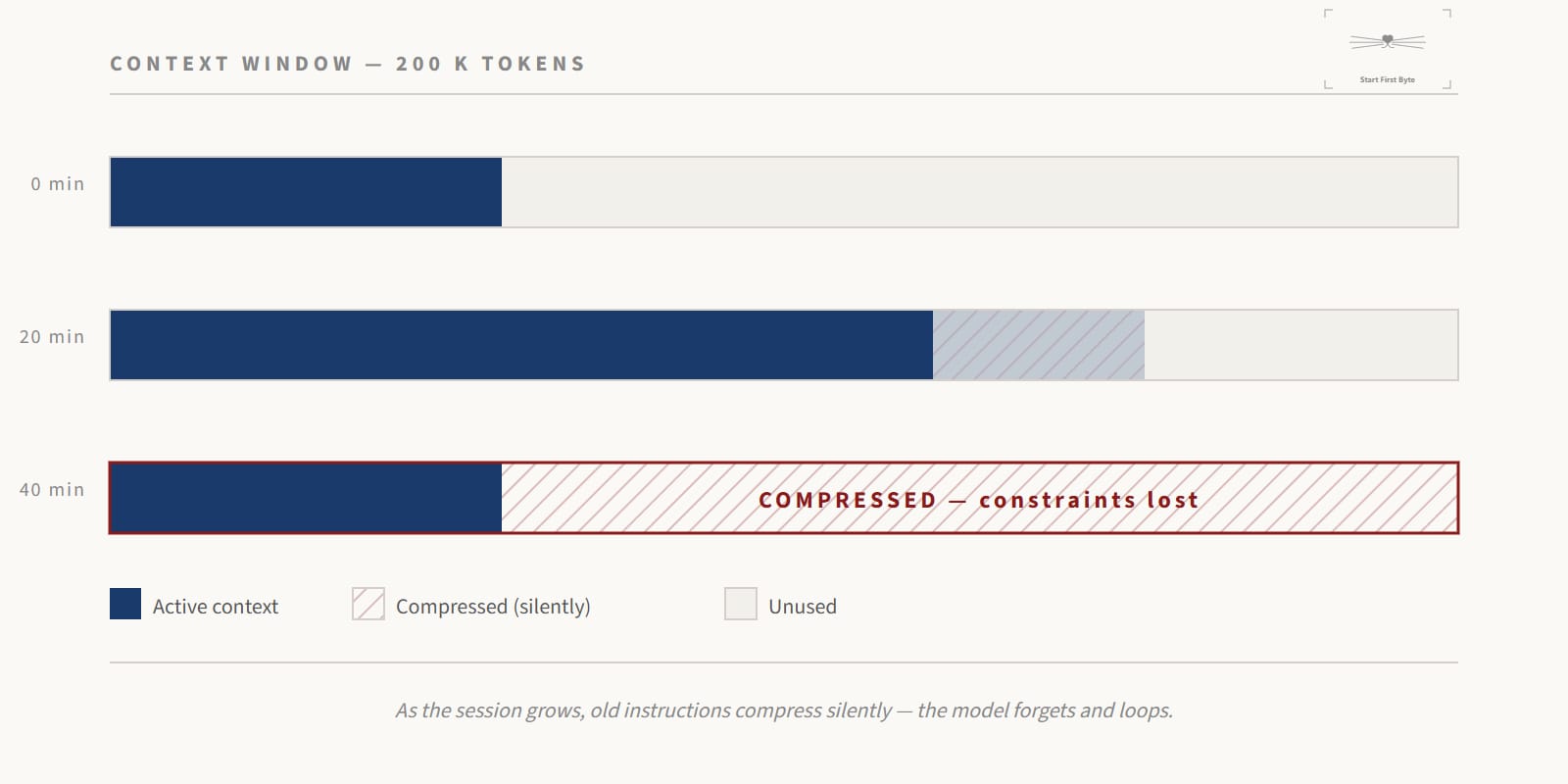
You're forty minutes into a coding session. Claude has read a dozen files, run several searches, processed API responses, iterated through errors. The context window is filling up. Something changes — a detail from earlier gets compressed away, an instruction gets forgotten. The model starts looping.
This is context rot. And it's not a bug you can fix. It's a fundamental property of how large language models work.
The standard 200,000-token context window sounds enormous until you start feeding it raw file reads, search results, and iterative trial-and-error. When it fills, the system silently compresses. Important constraints disappear. The AI doesn't tell you — it just starts making subtly wrong decisions.
Subagents are the architectural answer to this problem.
What Is a Subagent
A subagent is an AI instance that runs in its own context window, separate from your main session. It receives a specific task, a custom system prompt, a defined set of tools, and operates completely isolated from the main conversation flow.
Think of it as a professional subcontractor. You don't bring the entire project history to every specialist you hire. You give them a clear brief, the tools they need, and a well-defined deliverable. They return the finished work. Your main session stays clean.
Claude Code's ecosystem is built on a four-layer hierarchy:
Skills → Plugins → Subagents → Agent Teams
Each layer increases in autonomy, coordination complexity, and cost. Subagents sit at the critical middle — powerful enough to handle real work independently, simple enough to manage without orchestration overhead.
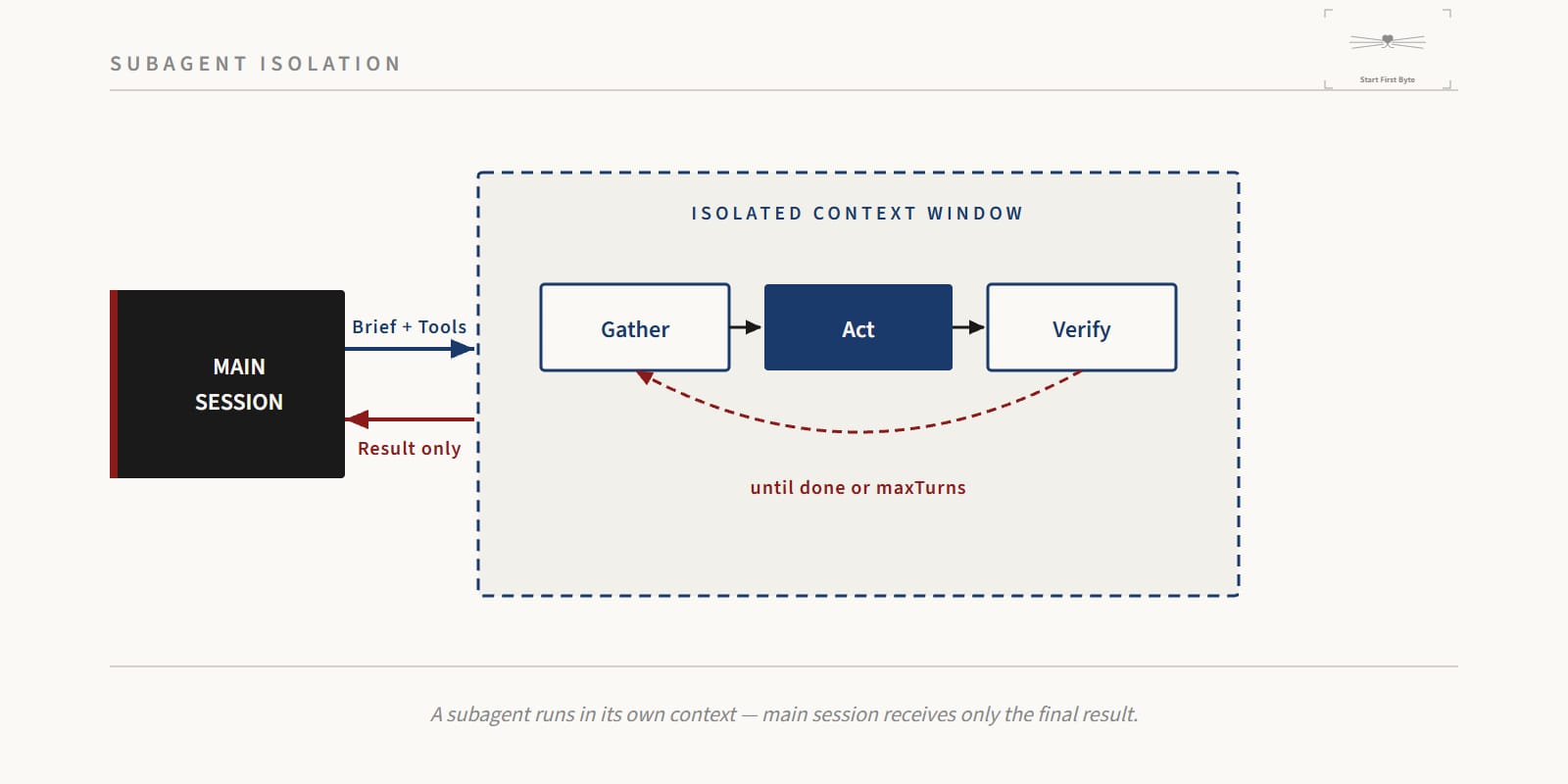
The core mechanism is the agentic loop: a subagent cycles through context gathering, action execution, and result verification until the task is complete or maxTurns is reached. During this loop, it can read files, write code, run bash commands, and search the web — all within its own isolated context. Only the final result surfaces back to your main session.
Configuration: The Frontmatter That Controls Everything
Subagents are defined as Markdown files with YAML frontmatter, stored in .claude/agents/. Every behavioral property is declared here.
---
name: security-auditor
description: >
  Triggered when reviewing code for security vulnerabilities,
  input validation issues, or authentication logic.
model: claude-opus-4-6
tools:
  - Read
  - Grep
  - Bash
disallowedTools:
  - Edit
  - Write
permissionMode: default
maxTurns: 20
memory: project
---

You are a security-focused code reviewer. Your job is to identify
vulnerabilities, not fix them. Return findings as structured JSON
with severity levels: blocker, high, medium, low.
The fields that matter most:
| Field | What It Actually Does |
|---|---|
name | Lowercase identifier. Used for direct invocation. |
description | The routing logic. Claude reads this to decide when to delegate automatically. Write it precisely. |
tools / disallowedTools | Hard permission boundaries. A read-only auditor should never have Edit. |
model | haiku for simple tasks, sonnet for most work, opus for complex reasoning. Gets expensive fast if misused. |
permissionMode | acceptEdits lets the agent apply changes without confirmation. Use only for non-sensitive, repeatable tasks. |
maxTurns | Your circuit breaker. Prevents infinite correction loops from burning your token budget. |
memory | project scope lets the agent learn your codebase's patterns across sessions. |
Model selection follows a strict priority chain: environment variable CLAUDE_CODE_SUBAGENT_MODEL → call parameter → frontmatter → main session model. Set the env variable to enforce a cost ceiling across all subagents at once.
Why Subagents: Three Strategic Arguments
1. Context Isolation
When an agent does data-intensive work — scanning hundreds of files, processing API responses, raking through logs — all that raw data lands in the context window. With subagents, that pollution stays contained. The subagent churns through the intermediate steps in its own space and returns only the distilled result. Your main session keeps its focus on strategic decisions.
2. Parallelism
Sequential is slow. In a typical API integration project, the backend logic and the frontend components share a specification but don't depend on each other during implementation. Run them simultaneously with two subagents. A task that takes ninety minutes in sequence takes thirty in parallel.
3. Specialization
Different subagents can have different characters. A security-auditor that's permanently suspicious of input handling. A documentation-writer that enforces readability standards. A database-optimizer that only speaks in query plans and indexes. Separation of concerns at the AI layer. Each agent becomes reliable within its domain because it isn't trying to handle everything.
Design Patterns for Multi-Agent Systems
Pattern 1: Sequential Handoffs
Arrange agents like a production line. Each one produces a structured artifact — a Markdown file, a JSON spec, a test report — that becomes the input for the next.
product-manager → Ticket.md → senior-engineer → code → code-reviewer → report
The key insight: agents receive only what they need, not the entire conversation history. Structured handoff documents are more reliable than passing raw context.
Pattern 2: Iterative Feedback Loops
Automate the review-fix cycle. An engineer agent writes code. A reviewer agent analyzes it and returns a structured report:
{
  "status": "needs_revision",
  "blockers": ["SQL injection in user input at line 47"],
  "high_priority": ["Missing rate limiting on auth endpoint"],
  "suggestions": ["Consider extracting validation logic"]
}
The orchestrator reads the status. If not "green", it sends the code back to the engineer with the specific feedback. The loop continues until the reviewer signals approval. No human in the loop for the revision cycle.
Pattern 3: Layered Decomposition
Match agents to architecture layers. Each agent gets access only to the directories and tools relevant to its layer:
- Database agent →
/src/db/, read and write SQL migrations - API agent →
/src/routes/, no database access - UI agent →
/src/components/, no backend access
This isn't just organization — it's risk management. An agent can't accidentally corrupt the database layer because it doesn't have the tools to touch it.
Pattern 4: Document and Clear
The simplest pattern, and often the most underused.
When a session gets long and the model starts showing signs of confusion — repeating earlier mistakes, contradicting previous decisions — stop. Ask Claude to write all current progress, architectural decisions, and next steps into a Markdown file. Then run /clear.
Start a fresh session by loading that summary. The model now operates with maximum attention on a clean, dense brief rather than a degraded 150,000-token context full of noise.
Tutorial: Building Your First Subagent
Step 1: Create the directory
mkdir -p .claude/agents
Step 2: Define the agent
Create .claude/agents/code-reviewer.md:
---
name: code-reviewer
description: >
  Use when asked to review code quality, check for bugs,
  assess test coverage, or evaluate a pull request diff.
model: claude-sonnet-4-6
tools:
  - Read
  - Grep
  - Bash
disallowedTools:
  - Edit
  - Write
permissionMode: default
maxTurns: 15
---

You are a senior software engineer doing a code review.
Focus on: correctness, edge cases, performance, and maintainability.
Do not fix the code. Report findings in this JSON structure:

{
  "verdict": "approve | request_changes",
  "summary": "one sentence",
  "issues": [
    { "severity": "blocker | high | medium | low", "location": "file:line", "message": "..." }
  ]
}
Step 3: Invoke it
The agent activates automatically when you describe a matching task:
Review the authentication service for any security issues.
Or invoke directly by name:
Use the code-reviewer agent on src/auth/
Step 4: Use the /agents CLI for iteration
Run /agents in Claude Code to open the agent management interface. The "Generate with Claude" option lets you describe the agent in plain language and get a complete definition back. Faster for prototyping new agent roles.
Step 5: Commit to version control
Subagent definitions in .claude/agents/ should live in your repository. Everyone on the team gets the same agent behaviors. The agents evolve alongside the codebase.
What This Costs
Subagents are not free. Every agent initialization loads the full system context for tool definitions before processing a single line of your request.
For Claude Pro and Max subscribers, this is absorbed into the subscription. For API users, it compounds quickly with parallel workloads.
Cost discipline looks like:
- Haiku for formatting commits, syntax checks, simple file reads
- Sonnet for most code work and agent orchestration
- Opus only for architecture planning and genuinely hard reasoning problems
Use /stats to monitor your token consumption patterns. Keep CLAUDE.md under 500 lines — it loads into every session including every subagent initialization, so every unnecessary line multiplies across your entire fleet.
Prompt Caching handles the fixed costs of system prompts and tool definitions automatically. The variable cost is your task complexity and the number of turns each agent needs.
Safety: Hooks as Hard Guardrails
System prompt instructions are suggestions. Hooks are enforcement.
Hooks are shell scripts that execute at specific points in the agent lifecycle. They run outside the model's control. If a PreToolUse hook exits with a non-zero code, the action is blocked — unconditionally.
A PreToolUse hook blocking direct pushes to main:
#!/bin/bash
TOOL_INPUT=$(cat)
if echo "$TOOL_INPUT" | grep -q '"main"'; then
  echo "Direct push to main branch is prohibited." >&2
  exit 1
fi
exit 0
A PostToolUse hook running tests after every file write:
#!/bin/bash
npm test --silent
This is how you turn "the agent should follow these rules" into "the agent cannot violate these rules." Every constraint that matters goes in a hook. Run /hooks to see what's active in your current session.
The Shift This Represents
Subagents aren't just a productivity feature. They represent a different mental model for software development.
The agent configuration files — the Markdown definitions, the hook scripts, the task structures — are part of the codebase now. They get committed, reviewed, versioned like any other source file. The work of setting up a reliable agent system is engineering work: designing clear interfaces, enforcing boundaries, building feedback loops.
The engineer's job is evolving from writing code directly to designing systems that write code reliably. The output of that work isn't just the application — it's the agent infrastructure that builds and maintains the application.
Context rot was the first problem. Subagents solve it. The next problem is designing agent teams that coordinate well enough to tackle problems that exceed what any single session can hold.
References: Anthropic Claude Code documentation, Claude Code Ultimate Guide (GitHub), Context Mode MCP Server (mksglu), Anthropic Courses — Introduction to Subagents.